
Setting your System Settings
 To access system settings, you must login as a user with an administrator role. See company roles for more information.
System Settings stores generic settings which control some system-wide functions, including email, printers, file storage locations.
The settings apply only to the user who is currently logged on.
You can access System Settings in two ways:
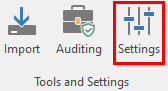
- On the Ribbon Bar in Tools and Settings click on Settings
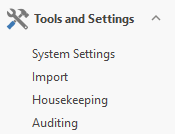
- In the Navigator in Tools and Settings click on System Settings
System Preferences contains a number of tabs:
- General is used for miscellaneous settings that are scattered throughout the system.
- File Locations is used to set locations for files generated by the system, including backups and EFT files.
- Appearance looks at the desktop colours for the current user.
- Enquiries shows each of the report enquiry screens, its default report, and the report which is currently assigned.
- Email has two tabs: Email Settings which is used to control email settings and Email Preferences which is used to set a confidentiality statement and encrypt or password protect attachments.
- Payrun refers to how Payrun will appear and behave.
- Security refers to the use of passwords and security groups
- Search specifies the 'look and feel' of the search function.
- Human Resources is used to specify if Position titles are displayed in the Organisation Chart and display settings. (Only applicable to those with HR).
- OHS this allows you to specify a number of settings which are relevant only if you are using OHS.
- Alerts refers to the display and behaviour of To Do Task reminders.
- Webservices this is an advanced setting which references linking to external software. For more information, please discuss with your Ready Pay Customer Success Manager.
- STP Setupis used to activate and register your companies for STP reporting
- Flare is used to activate Flare Onboarding of new employees. For more information, please discuss with your Ready Pay Customer Success Manager.